Frame Mockup Interior PS-Canva Template: Elevate Your Designs
When you're presenting artwork, photography, or branded graphics, the context matters just as much as the content itself. A beautiful piece displayed on a sterile white background can feel flat, but place it within a thoughtfully styled interior scene, and suddenly it has life, scale, and emotional resonance. The Frame Mockup Interior PS-Canva Template set offers a practical solution for designers, marketers, and creators who need to showcase their work in realistic, visually appealing environments without spending hours on complex 3D rendering or expensive photo shoots.
What Exactly Is This Template Set?
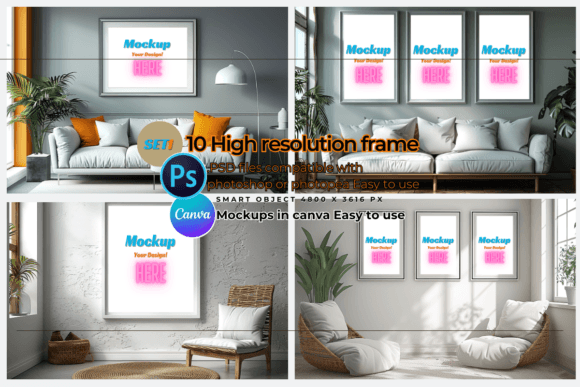
This collection includes ten distinct interior frame mockups, each delivered as a layered Photoshop PSD file alongside a custom Canva template link. The dimensions are generous at 4800 by 3616 pixels, giving you ample resolution for both digital displays and print materials. Each file features a transparent layer structure that makes it straightforward to insert your designs, whether you're working with vinyl sublimation projects, digital art prints, or branded social media content.
The visual style leans toward contemporary interior design aesthetics. You'll find scenes that suggest modern living rooms, minimalist office spaces, and cozy bedroom walls. The frames themselves vary in style and proportion, offering options that range from thin, understated borders to more substantial, gallery-style presentations. This variety means you're not locked into a single look. One mockup might suit a sleek tech brand's product showcase, while another works perfectly for a watercolor artist's portfolio presentation.
What makes this set particularly useful is the dual-format approach. If you're comfortable with Photoshop and prefer the precision of layered editing, the PSD files give you full control. If you work primarily in Canva and value speed and simplicity, the linked templates let you drag and drop your artwork directly into the frame. Both paths lead to professional-looking results, and having both options available means you can choose the workflow that fits your current project and skill level.
Where These Mockups Deliver Real Value
Consider how often you need to present finished work to clients, social media followers, or potential buyers. An interior mockup transforms a flat graphic into something tangible. A logo design displayed on a framed print in a styled room communicates professionalism and helps the viewer imagine the work in their own space. This is especially valuable for small business owners selling prints on platforms like Etsy, photographers building portfolio websites, or designers pitching concepts to clients who struggle to visualize abstract ideas.
Social media graphics benefit enormously from this kind of contextual presentation. Instagram feeds, Pinterest boards, and Facebook ads all perform better when the imagery feels lived-in and aspirational. Instead of posting a plain artwork file, you can share it as it might appear on someone's wall, which creates an emotional connection and often drives higher engagement. Bloggers and content creators can use these mockups to illustrate articles about home decor, art collecting, or interior styling without needing to stage actual photo shoots.
The commercial applications extend to packaging design presentations, editorial layouts, and brand identity showcases. Imagine presenting a complete brand system to a client where the logo, color palette, and typography are all displayed within a cohesive interior scene. It tells a story about how the brand lives in the real world, which is far more compelling than a flat PDF with swatches and font samples.
Practical Guidance for Getting the Most Out of Your Mockups
Start by matching the mockup style to your project's tone. A warm, textured interior scene with natural wood frames suits artisan brands, handmade goods, or anything with an organic, earthy personality. Clean, white-walled scenes with thin black frames work better for contemporary design portfolios, tech products, or minimalist branding. The frame proportions matter too. Square frames are versatile for social media, while portrait-oriented frames suit book covers or poster designs, and landscape frames fit wide-format prints or panoramic photography.
When inserting your artwork, pay attention to scale and positioning. A design that fills the entire frame looks bold and graphic, while one with generous white space around it feels more refined and gallery-like. Both approaches work, but the choice should align with the impression you want to create. Test how your design reads at the mockup's resolution. Fine text or intricate details might get lost if the artwork is too small within the frame, so ensure the key elements remain legible.
Color consistency is worth considering. The mockup scenes have their own lighting conditions and color casts, which can shift how your artwork's colors appear. Before finalizing, compare the mockup version against your original file to make sure the hues still feel accurate. If you're printing the final presentation, remember that screen colors and print colors rarely match perfectly, so communicate any critical color expectations clearly to your print provider.
Font pairing and typography within your displayed artwork should be tested in context. A serif font that looks elegant on its own might feel different when placed inside a frame mockup with specific lighting and background textures. View the complete composition as a whole rather than focusing only on the artwork in isolation. The surrounding environment influences perception, and what works on a blank canvas might need slight adjustments when framed.
For commercial use, the licensing terms included with this set allow both personal and commercial projects, which is important for anyone selling products, creating client work, or building a brand. Always review the specific terms before incorporating mockups into client deliverables or products for sale, and keep records of your purchased assets for reference.
The ability to resize these templates without quality loss adds another layer of flexibility. Need a high-resolution version for a printed catalog? Scale it up. Working on a web banner that requires specific dimensions? Adjust accordingly. The underlying resolution supports these adjustments gracefully, which means a single template set can serve multiple purposes across different projects and platforms.
Ultimately, the Frame Mockup Interior PS-Canva Template set functions as a bridge between your creative work and its real-world presentation. It removes the friction from the visualization step, letting you focus on the actual design while still delivering polished, context-rich presentations that resonate with your audience. Whether you're a seasoned designer managing multiple client projects or a hobbyist looking to share your art more effectively, having reliable mockup templates in your toolkit saves time and elevates the perceived quality of everything you produce.