Master Your Workflow with the Ultimate Office Tasks Planner Canva Template
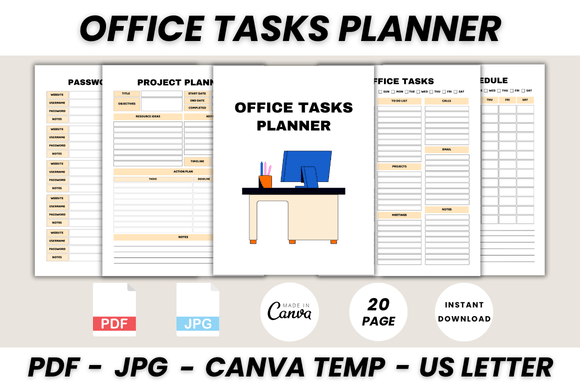
Running a business or managing a creative team often feels like juggling while riding a unicycle. Between tracking leads, managing passwords, and keeping up with daily schedules, the administrative side of creativity can quickly overwhelm your actual workflow. That is where the Office Tasks Planner Canva Template steps in. This isn't just a generic notebook; it is a comprehensive system designed to bring order to chaos. It includes 20 distinct printable pages, ranging from a dedicated Password Tracker and Call List to a structured Project Timeline and Yearly Overview. The visual style is clean, professional, and functional, utilizing a minimalist aesthetic that prioritizes readability over decoration. It serves as the organizational backbone for anyone needing to track projects, manage contacts, and plan their week without the friction of building documents from scratch.
Visual Style and Practical Application
When you open the Office Tasks Planner Canva Template, you will notice that the design personality leans towards a modern, corporate-casual feel. It avoids overly playful scripts or complex display fonts that might look beautiful but fail under scrutiny when you are trying to read a phone number quickly. Instead, it relies on a harmonious balance of sans serif typography for body text and bold, clean headers to guide the eye. This approach ensures high legibility, which is critical for documents like the Meeting List or Contact List where information density is high. The layout utilizes negative space effectively, preventing the pages from feeling cluttered even when filled with data. For small business owners and entrepreneurs, this visual clarity translates directly to efficiency; you can scan the Weekly Schedule or Project Planner at a glance without straining your eyes, making it a practical tool for daily operations.
Customization and Brand Consistency
One of the most significant advantages of using Canva for this planner is the ease of customization. You do not need to be a graphic design expert to make this template your own. Because it is built within Canva, you have full control over the design assets. This means you can easily adjust the color palette to match your existing brand identity. If your brand uses a specific shade of teal or a particular serif font for headings, you can swap those in within minutes. This level of customization is vital for maintaining professionalism. When you print out the Project Timeline or the To-Do List, it should feel like a natural extension of your business stationery. You can upload your logo to the "Belongs To" page, ensuring that even your internal planning documents reinforce your brand recognition. The ability to resize these elements also means you aren't locked into a single format; you can adapt the design for different digital screens or print sizes depending on your needs.
Strategic Organization for Creative Professionals
The true value of the Office Tasks Planner Canva Template lies in its structure. It acknowledges that modern professionals wear many hats. The inclusion of a Lead Follow-Up page is a nod to the sales and marketing aspect of business, while the Project Planner caters to the operational side. For content creators and bloggers, having a centralized place for the "Call To Make" list or "Important Notes" prevents those fleeting ideas or urgent tasks from getting lost in the shuffle of digital notifications. Furthermore, the Password Tracker is a practical necessity for digital marketers and web designers who manage multiple client accounts. By separating these functions into distinct, well-designed pages, the template encourages a more disciplined approach to task management. It moves you away from chaotic sticky notes and toward a cohesive system that supports growth.
Design Observations and Readability
From a design perspective, the typography choices within the Office Tasks Planner Canva Template facilitate a strong visual hierarchy. The headers are typically bold and distinct, separating sections like "Monthly Planner" from "Daily Schedule" clearly. This hierarchy is essential for usability; it allows your brain to process information faster because it knows exactly where to look. The use of checkboxes in the To-Do List and the structured grids in the Weekly Schedule are standard UI patterns that users find intuitive. There is no learning curve to using this planner, which is a hallmark of good design. Whether you are a crafter tracking inventory or a marketer tracking campaign timelines, the template provides a reliable framework that you can trust to hold your most critical business data.
Conclusion
Ultimately, the Office Tasks Planner Canva Template is more than just a collection of pretty pages; it is a functional tool designed to streamline your professional life. It bridges the gap between aesthetic appeal and practical utility, offering a customizable solution that fits various industries. By utilizing this template, you are not just organizing your tasks; you are creating a system that supports your business goals and reflects your professional standards. It is an investment in clarity, allowing you to focus your creative energy on the work that matters most.